Leadspace Blog
Thoughts, tips and best practices for B2B Sales and Marketing
-
From Static To Dynamic: Data You Can Actually Use

B2B Sales and Marketing teams, in particular, absolutely love buyer data – they depend on it to do their jobs! Unfortunately, most companies are failing to use it to its potential. The goal is usually to use buyer data to determine who might want their product, but a company’s data is often such a mess […]
-
Easily Adopted CDPs: The Difference Between Success and Shelfware

When it comes to tools, everyone appreciates the ones that work, and usually that means they are easy to use. Unfortunately, analysts report that at any time, 25%+ of our business software is actually shelfware. Shelfware refers to software or technology solutions that have been purchased by a business but are not actively used or […]
-
Leadspace: The CDP That’s Actually Ready to Use

If you’re involved in enterprise-level B2B sales and marketing, you know that in order to compete, you’ll need a Customer Data Platform (CDP) to maintain the massive amount of buyer data that goes into data-driven decision making. If you’re still trying to decide which CDP is best for your company, you’re in luck, because Forrester […]
-
Identity Resolution: The Cornerstone of Your B2B Data Strategy

Identity resolution is the unsung hero in GTM ROI. Fundamental to any sales & marketing endeavor is knowing who that buyer is – and what role they play in any buying team. It’s the difference between flying blind and flying smart. Whether or not you have a strong identity resolution framework is the main factor […]
-
Do You Really Need the Best Identity Resolution & Active Profiles Available?

Answer: Of course you do! Sales & Marketing teams know that targeting customers with incomplete and siloed data is a complex process. Having a single, comprehensive view of your customer data in one place makes it significantly easier to effectively target the right people at the right time with personalized campaigns. Unfortunately, creating active, unified […]
-
Leadspace and Forrester New Wave™
Forrester Research evaluated 14 B2B Customer Data Platforms, considering 10 key capabilities, and published their findings in The Forrester New Wave™: B2B Standalone CDPs, Q4, 2021. Leadspace was among those evaluated, and ranked as a leader in nearly every category! We assure you that we are still providing the best-in-class buyer profiles and predictive AI […]
-
Stop Spending Money on Siloed Data. Get Pre-Blended 3rd-Party Data for Half the Cost!
As B2B marketers, we aim to deliver effective campaigns targeted at the best opportunities within our Total Addressable Market (TAM) – at the lowest cost. Doing this successfully starts with creating complete, accurate, dynamic and unified buyer profiles of people, accounts and buying centers so we can properly prioritize and target opportunities with data-driven assurance […]
-
Getting Robbed by Data Vendors? Get Best-in-Class B2B Buyer Profiles for 50% Less!

As B2B marketers, our goal is to deliver effective campaigns targeted at the best opportunities that exist within our Total Addressable Market (TAM) – at the lowest possible cost. This involves identifying our Total Addressable Market (TAM), developing our Ideal Customer Profile (ICP), and then comparing our ICP throughout our TAM to determine which opportunities […]
-
Leadspace Earned 9 Awards by G2 Across Multiple Categories in Fall 2023 Report!
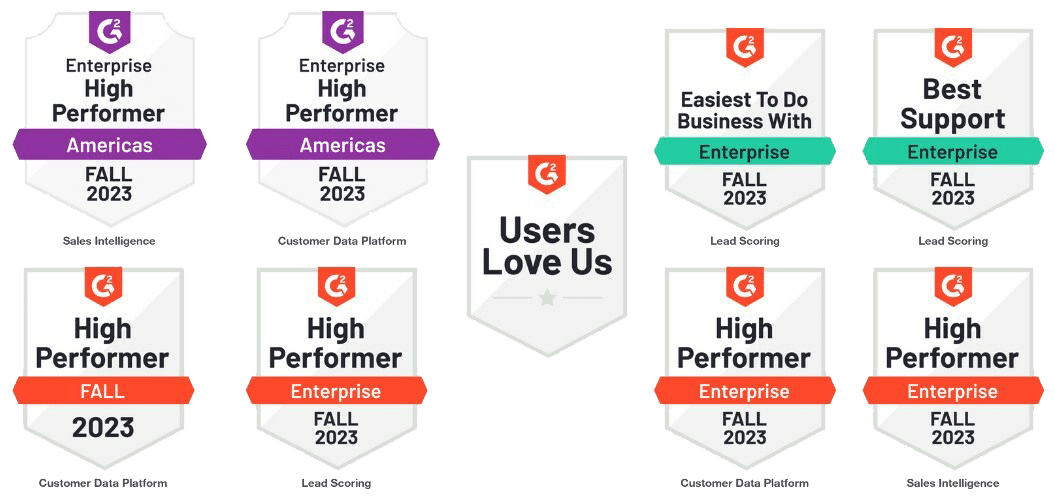
Today, we’re excited to report that Leadspace has once again achieved numerous awards from G2 in 2023. We earned eight new G2 high performer badges across three categories: Customer Data Platforms; Sales Intelligence; and Lead Routing in the Enterprise Grid Reports and the Enterprise Americas Regional Grid Reports for Fall 2023. In addition, Leadspace was […]
-
Are You Wasting Your Salespeople’s Time? Apply Weighted Engagement Scores in Marketing

An engagement scoring model is often the signature move for a demand generation team – and they’ve been around for a long time in the marketing world. Most campaign teams use them as a way to understand when a “lead” is ready to be routed to sales. Some teams use simple off-the-shelf models from their […]
-
AI Persona Scoring – When Job Title Guesswork Doesn’t Work

A persona refers to a representation of a user or buyer segment that is created to better understand and design for the needs, behaviors, and preferences of that group. Persona creation is common in fields like marketing, user experience (UX) design, and customer service. It’s especially useful in sales and marketing when it comes to […]
-
Lead Conversion Starts with Signals – Use Fit Scoring or Lose Business!

Identifying the best leads is essential for any company’s success as it helps focus resources and efforts on prospects most likely to become customers. In marketing, we have limited resources (employees, money, time) – we rarely have the ability to “spray and pray” with our sales & marketing efforts. Going at the wrong person before […]
-
Are Your Leads Worth Pursuing? Throw Most of Them Out!

If someone is interested in your product or service, is it necessarily true that they will convert into a paying customer in the future? Does a higher level of interest translate into higher odds of sales conversion? How do we know if the way we are measuring and assessing their interest is accurate? Is that […]
-
Relying on Intent Data Alone: More Harm than Good?

Three out of four B2B sales and marketing teams rely on intent data to prioritize ABM outreach. Intent data is incredibly important as it provides insight into which companies are searching for you – i.e. which companies are demonstrating some level of intent to use your type of product (or specific product). While that’s useful […]
-
Revenue Radar™: Finding the Right Buyers with Engagement Scores

Throughout this Revenue Radar blog series, we’ve discussed how to use Leadspace predictive AI models to determine the companies within your Total Addressable Market (TAM) who need your product (highest Fit scores), which of those companies are actually ready to buy your product (Intent scores), and which buyer Personas are best for you to pursue […]
-
Revenue Radar™: Finding the Right Type of Buyer Using Persona Scoring Models

In our last few blogs, we discussed using Fit (propensity) models to determine the companies within your TAM who need your product, and how to determine which of those companies are actually ready to buy with Intent scores. Now you need to figure out who are the right people to pursue within those companies. Does […]
-
Revenue Radar™: Finding the Right Company Using Intent Scoring Models

Finding the right type of companies within your TAM that need your product is a huge step towards closeable business, but you still need to figure out which of those companies are actually ready to buy your product – this is where intent comes into play. We can determine intent by a company’s search activities. […]
-
Revenue Radar™: Finding the Right Type of Companies Using Fit Scoring Models

Finding the right type of companies for your product by hand is a cumbersome process that’s error prone and heavily relies on guesswork. With competition at an all time high, B2B sales and marketing teams need a way to automate this process, and replace guesswork with data-driven insights to reach their customers before their competitors […]
-
Revenue Radar™: An Introduction to AI Targeting

As marketers, we aim to confidently and repeatedly deliver effective campaigns to the best opportunities within our target market – at the lowest possible cost. This means identifying our TAM (Total Addressable Market), developing our Ideal Customer Profile (ICP), and comparing our ICP throughout our TAM to determine which opportunities to focus on, then get […]
-
Leveraging Artificial Intelligence for Customer Targeting

The best way to answer this question is through a company Fit or propensity model that identifies which of these intent-surging accounts your company is most likely to close. Company Fit or propensity models compare your historical data and ICP against all the profiles within your TAM then use AI/ML-Analytics to algorithmically score them by a variety of buying signals to determine their propensity to buy your product right now – as well as indicating whether or not they’re likely to buy in the future.
-
Improving Sales Territory Management and Planning

Aligning your teams to ensure sales quotas are met has never been easy, and the current environment has only made it harder. If your sales goals are not being met, it may be time to optimize your sales territory management strategy by utilizing all available resources effectively to boost sales productivity. What Is Sales Territory […]
-
Data Decay: What, Why and How?

People and companies change every day. Companies make acquisitions, people change jobs, and intentions are dynamic. This means your data changes every day – but is your database up to date? Is the data you use to drive your business as accurate as the day you procured it? Data Decay is an issue that every […]
-
Salesforce Study: Less Complexity, Better Integrations and Immediate Cost Reductions

Pulse and Salesforce surveyed 500 IT leaders across the globe to find out 7 trends and the best practices that are reshaping IT. How are they navigating the data security complexities and pushing forward on their digital transformation goals? What are their winning strategies for retaining talent and resources? And how do they drive innovation […]
-
Moneyball ABM: Aligning Outbound with Readiness and Engagement

In the last few blogs I discussed how to discover your TAM and assign territories, then how to determine where to focus your sales and marketing efforts by using AI/ML models to score leads and understand who is ready, eager and able to buy your product. We also discussed how to turn the profiles within […]
-
Moneyball Campaigns: Map and Define Marketing Campaign Segments By Territories

In the last two blogs I discussed how to discover your TAM and assign territories, and then how to determine where to focus your sales & marketing efforts by using AI/ML models to score leads and understand who is ready and able to buy your product. Now let’s look at how to turn the profiles […]
-
Moneyball Navigation: Map Account Readiness to Your TAM

It’s always that time of year. In sales and marketing we’re always starting a new quarter, ending a new quarter, trying to create demand for the following year or just planning. We always want to start strong and grow better. Assuming you start strong – how do you grow better? How do you outsmart the […]
-
Moneyball for Sales Territory Management

It’s Q4 for most of us, and this is the time of year when revenue operations professionals spend time understanding and redefining sales territories. Sizing territories alone is next to impossible to do by hand, and the tedious process of narrowing down all of the possibilities is expensive, time consuming, and error prone. Even after […]
-
How to Double Your Account-Based Marketing Performance

Choosing ABM accounts based on gut or table stakes profiling – like firmographics – isn’t enough anymore. Successful ABM comes down to discovering your TAM, building profiles at the person, account, and buying center levels, and then comparing them against your ICP in order to focus your time and effort on the accounts most likely […]
-
5 Ways to Use Intent Data for Sales and Marketing

B2B Marketing and Sales leaders are constantly looking for the next innovative method to give them a competitive edge—particularly in driving revenue for their business. If you work in sales or marketing, there probably hasn’t been a day where you have not heard about implementing or operationalizing intent data to target and engage your prospects […]
-
What is Enterprise Profiling?

As B2B marketers, our goal is to deliver effective campaigns targeted at the best opportunities that exist within our Total Addressable Market (TAM) – at the lowest possible cost. This means identifying your TAM, developing your Ideal Customer Profile (ICP), and comparing your ICP throughout your TAM to determine which opportunities to focus on, then […]
-
Managing B2B Profiles for Full Funnel Optimization

As B2B marketers, our goal is to deliver effective campaigns targeted at the best opportunities that exist within our Total Addressable Market (TAM). Of course, this means identifying your TAM is the first step. The following steps are – developing your Ideal Customer Profile (ICP), comparing your ICP throughout your TAM to determine which opportunities […]
-
Martech Interview with Amnon Mishor, Founder and CTO, Leadspace

Leadspace Founder and CTO, Amnon Mishor sheds light on how technology is upgrading the marketing sector and how they are preparing for an AI-Centric world. AI can dramatically improve the world we live in, and we have to shift the general paradigm to that, which requires education and scientific thinking. 1. Tell us about your […]
-
Moving Beyond Demand & ABM With B2B Customer Data Platforms

In this increasingly complex and dynamic B2B marketing environment, marketers are struggling to keep up with legacy demand and ABM strategies. Cutthroat competition and advancements in AI technologies are driving the need for B2B marketers to take full advantage of any and all tools available to stay one step ahead of their competitors. This means […]
-
Arming Your Team for the Future of B2B Marketing

In a recent report, The Future of B2B Marketing, Forrester indicated that B2B marketers are going to need to step up their game to meet marketing’s new challenges. Significant changes in buyer behavior, evolving business models, and technological advances in conjunction with a global pandemic are forcing an evolution in B2B marketing from—changing corporate purpose, […]
-
What is the Difference Between B2B CDPs and B2C CDPs?

With ninety percent of companies either evaluating or deploying a CDP, the question comes up as to the difference between a B2B CDP and B2C CDP. In a recent BrightTalk webinar, Amish Sheth (Leadspace VP, Solution Engineering) explored the capabilities and differences between a business-to-business customer data platform and a business-to-consumer customer data platform. What […]
-
Taking the Guesswork Out of Sales & Marketing

It’s always that time of year – in sales and marketing we’re always starting a new quarter, ending a new quarter, trying to create demand for the following year or just planning. We always want to start strong and grow better. Let’s assume you start strong. But how do you grow better? How do you […]
-
Optimizing Account Hierarchy with Leadspace’s Lead-to-Account Matching Maximizes Sales & Marketing Efficiency

Lead-to-Account Matching is an often overlooked capability of Customer Data Platforms. Depending upon volume, routing complexity, and the response time required in your GTM system, seemingly small errors in your pipeline can snowball into serious distractions and missed opportunities. Accurate lead-to-account matching is critical to response times in today’s GTM funnel. It provides a clearer […]
-
200 Marketers Survey Says…

As we all know, great Marketing is the right balance of art and science. This week let’s take a look at how to use marketing science to free up time for marketing art. Last week, Leadspace participated in the GDS Summit event along with roughly 200 marketing executives to explore how technology is changing the […]
-
Revenue by Design: Creating Closeable Inbound Lead Flow

As a leader in the Forrester Wave, Leadspace is fortunate enough to meet with hundreds of companies every quarter who are looking to tackle sales & marketing challenges. Typically, the challenges fall into 4 categories – profiling, targeting, campaigning, and closing. Let’s take a look at one of the most interesting customer use cases with […]
-
Revenue by Design: Grow Better in 90 days or Less

Why is it that Forrester Research finds that 90% of B2B companies are either implementing or looking to implement a CDP? This is an astonishing statistic. It’s surprising because most people question themselves with respect to what a Customer Data Platform (CDP) really is and whether they could describe it to their colleagues. Here are […]
-
How to Choose a B2B Customer Data Platform. Walking the Walk Through Our Execution Roadmap.
Keeping your word is arguably one of the most accurate measures of integrity and gives insight into the level of trust someone can put in you – the same goes for companies. However, when it comes to companies, especially within the B2B technology industry, carrying out a plan to deliver a promise and meet customer […]
-
How to Choose a B2B Customer Data Platform. Is your Market Strategy Aligned with Your CDP’s?

Market strategy is always an interesting topic to me as a product and go-to-market professional. Most often I think about it from the point of view of the company strategy rather than from the perspective of the customer. After all, it’s about how your company penetrates a market right? The phrases “actions speak louder than […]
-
How to Choose a B2B Customer Data Platform. Our Vision is All About Enabling Your Mission

A platform vision starts with the scope of the company, the product itself and the ecosystem that is built to enable a thriving market. It’s a description of the essence of the product: what are the problems it is solving, for whom, and why now is the right time to build it. A Product vision […]
-
How to Choose a B2B Customer Data Platform. Boost Sales & Marketing Op. Efficiency with Seamless Application Integration.
Marketing & sales operations systems are multifaceted, occupying across databases, channels and applications. Odds are that your team is using dozens of applications, each requiring different operational parameters. This brings us back to the challenges of leveraging siloed data and sharing scores and updated profiles in applications like CRM, bots, etc. While both are cumbersome […]
-
How to Choose a B2B Customer Data Platform. Know Your GTM Metrics & Data Inside & Out.
Low conversion rates from campaigns, high email bounce rates, and poor pipeline velocity are symptoms of a bigger problem – poor data health. Inaccurate, inconsistent, missing, or incomplete data can all negatively impact your bottom line and muddle most other sales and marketing metrics you are trying to optimize. Being able to evaluate your data’s […]
-
How to Choose a B2B Customer Data Platform. Achieving Actionable Insights with CDP Decisioning.
Over the last few blogs, we have moved through the process of building out and fueling your CDP, but how do you analyze high-volume data to derive and prioritize those most actionable insights to accelerate business outcome and maximize ROI? How do you determine your next best action? Which segments should you focus on? Which […]
-
How to Choose a B2B Customer Data Platform. Better Segments. Better Activation. Better Decisions.
In the last three blogs in this series, we discussed how to get your data together to fuel great buyer profiles and then how to use AI/ML-driven identity resolution to match incoming leads and changing buying signals with each of the profiles. Now let’s look at how to turn those profiles into actionable segments to […]
-
How to Choose a B2B Customer Data Platform. Achieving Better Unified Buyer Profiles.

In the last two blogs we’ve discussed how to get the best data together to drive complete, accurate and easily managed buyer profiles. Sales & Marketing teams know that targeting customers with incomplete and siloed data is tricky at best. Having a single, comprehensive view of your customer’s data in one place makes targeting the […]
-
Stop creating self-fulfilling prophecies: How to apply AI to small data problems

Over the past decade or so, the digital revolution has given us a surplus of data. This is exciting for a number of reasons, but mostly in terms of how AI will be able to further revolutionize the enterprise. However, in the world of B2B — the industry I’m deeply involved in — we are still experiencing a […]
-
How to Choose a B2B Customer Data Platform. Better Data Sources mean Better Decisions.

As we all know, buying signals come in many shapes and from many sources. In last week’s blog we discussed how to bring them all together to create buyer profiles at the account, buying center and contact level. Now let’s look at how to practically source all of this data easily while understanding how you can […]
-
How to Choose a B2B Customer Data Platform. Better Data Integration means Better Decisions.

Complete buyer profiles at the account, buying center and contact level are critical. This starts with leveraging your ongoing 1st party data with a variety of 3rd party data to create profiles (or a full buyer data graph) — combining what you know about the customer with what the world knows about the customer — […]
-
Leadspace Ranked a Leader in the Forrester New Wave: B2B Standalone Customer Data Platform Q4 2021
Today marks an important milestone for Leadspace, our customers, our data suppliers and our GTM partners. We are one of three companies that is ranked a Leader from the more than a dozen select companies that Forrester invited to participate in its Forrester Wave™ evaluation, The Forrester New Wave™: B2B Standalone CDPs, Q4 2021. If […]
-
Forrester Says the Need for More and Better Data Is Driving CDP Adoption

What’s new in Forrester: New-Tech Customer Data Platforms, Q3 2021 It’s been over two years since Forrester last published the Forrester New Wave™: B2B Customer Data Platforms, and a lot has happened since then. At the end of last month, the newest version of The Forrester New Tech: Customer Data Platforms, Q3 2021 was released. […]
-
Delivering on the M&A Growth Promise: A CDP Can Help You Beat the Odds

M&A on the rise As a viable growth strategy, there’s often an uptick in M&A after events like the 2008 recession. This looks to be ringing true as the U.S. economy rebounds from COVID-19. M&A activity set records for the first half of 2021 with deal counts up 19% from 2020 (Refinitiv). And things don’t […]
-
From Customer Data to Customer Intelligence: The Evolution of the B2B CDP

If you’ve read more than a handful of marketing blogs, you’ve likely come across the phrase “a 360-degree view of the customer.” That’s the ideal for every marketer and sales rep, right? The more you know about your customers, the more likely you are to use your time and effort wisely when engaging those customers. […]
-
7 B2B Lead Scoring Best Practices for 2021
Generating a ton of leads for your B2B company seems great…until you realize that those leads aren’t turning into opportunities at rates anywhere near where they should be. This is a common issue B2B companies have been battling for a while now. Almost a decade ago, Marketing Sherpa’s B2B Marketing Benchmark Report revealed that 61% of […]
-
Is Your MarTech Stack Hindering Your B2B Growth?

What do most B2B marketers do when building their first martech stack? Odds are, they begin with a Google search and end up with a dozen open tabs for the solutions they’re considering. Martech tools, after all, abound. In fact, according to ChiefMartec.com, in 2020, there are over 8,000 martech solutions available, a figure that has grown […]
-
B2B Segmentation vs. B2C Segmentation: A Look at the Differences

What’s the difference between marketing for a B2B company and a B2C company? While some might argue that the lines are blurring, we think there are still some key differences. One thing that sets the two apart is in the way you approach your target audience. B2C businesses tend to focus on appealing to their […]
-
How to Choose a Data Unification Platform

Data for businesses in 2020 is like gold was in the Wild West of the 19th century. It’s the lifeblood of the biz-economy, and folks will do (almost) anything to get their hands on it. Now that the data gold rush is well established, data is easier to come by. However, businesses now have to learn how […]
-
Look-Alike Modeling: The B2B Marketer’s Secret Weapon

It’s 2020 — are you excited about building your next target accounts list? Probably not. It’s true you want to expand your current list of accounts, but you’re likely not looking forward to going through the slow, manual process of finding and handpicking who to target. Unfortunately, this is the sad truth for too many B2B […]
-
How to Use Intent Signals: 4 B2B Marketing Tips

What if there was a way your sales team could be notified when an account was ready to be pitched your product or service? It sounds too good to be true, so it probably is…right? Not exactly. There are already B2B companies boosting their revenue with timely targeting. And it’s all thanks to intent signals. […]
-
How to Use ICPs and Buyer Personas for Sophisticated Segmentation

You created an ideal customer profile — what next? If you’re like most businesses, you’re using ICPs to develop your marketing campaigns. The issue with this is that your data may be incomplete. Because of this, your campaigns are bound to struggle (or even fail). Let’s take a look at what you can do to […]
-
5 Ways to Handle Customer and Market Segmentation Like a Pro

Marketers who use market segmentation are seeing a 760 percent increase in revenue. What’s stopping you from seeing similar results? If you’re not already using market segmentation techniques and would like to, then make sure you’re doing it the right way. You can use segmentation to improve your email campaigns, ads, and even your blog content. In this guide, […]
-
6 Ways to Make Your Data Analysis More Reliable

In recent years, big data has exploded, and big data analytics are now more accessible and of higher quality than ever before. This has led to a scrambling among business owners to improve their own data collection and analysis. There are a lot of tactics you can implement to improve data quality and achieve greater […]
-
7 Best Practices for Effective Data Management in 2019

As digital marketing evolves, data management is becoming the backbone of a good online marketing strategy. Having clean, quality, reliable data that gives strong insight into your customer data and behavior patterns is essential to creating marketing campaigns and automations that properly nurture your leads and turn them into buying customers. To ensure your company’s data […]
-
Marketing Effectiveness: What It Is and 4 Ways to Measure It

Marketing effectiveness is measured by how well a company’s marketing strategies increase its revenue while decreasing its costs of customer acquisition. You will always win the day if your marketing continually lowers the costs of finding and winning business, while also increasing the value of that business. However, how does one go about measuring both […]
-
The 5 Most Popular Methods of Segmentation for B2B

Customer segmentation is powerful because it allows marketers to draw an accurate picture of their customers, group them according to similarities, and devise pinpointed messages to specific segments of their customer base. Inevitably, these messages are personalized and tailored, which results in a significantly higher number of conversions. But there is no one single way […]
-
4 Examples of Integrated Marketing Done Right

The purpose of integrated marketing is to provide consumers with a seamless brand experience across all channels, including paid channels and organic ones. Integrated marketing strategies, therefore, rely on brand identity being communicated with consistency, using channels and techniques that complement each other and form a unified, integrated whole. Clearly, there are plenty of moving […]